Ringing Alert Sound - Flashing DIC & Compass 1997 SSEi

Series I L27 (1992-1994 SE,SLE, SSE) & Series II L36 (1995-1999 SE, SSE, SLE) and common problems for the Series I and II L67 (all supercharged models 92-99) Including Olds 88's, Olds LSS's, Olds 98 91-96, Buick Lesabres and Park Avenue 91-96. Please use General Chat for non-mechanical issues, and Performance and Brainstorming for improvements.
Post Reply
User avatar
jonnevilleSSEi
GXP Member
GXP Member
Posts: 278
Joined: Sat Dec 11, 2010 9:09 pm
Year and Trim: '97 SSEi
Location: Newtown Square, PA
Contact:

Ringing Alert Sound - Flashing DIC & Compass 1997 SSEi

Post by jonnevilleSSEi »

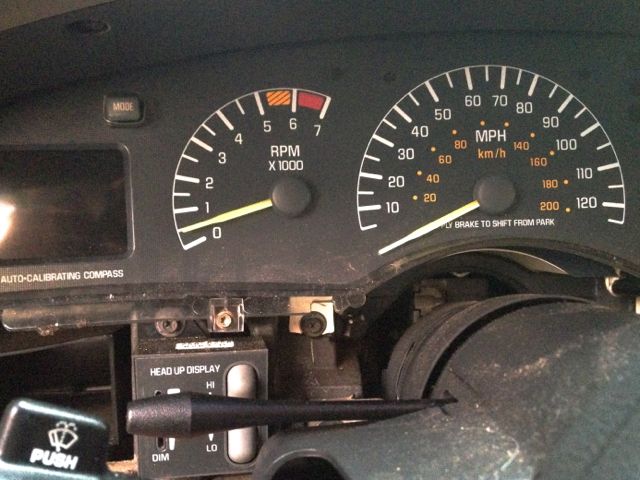
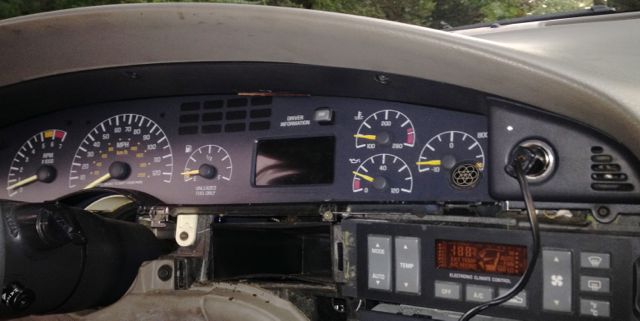
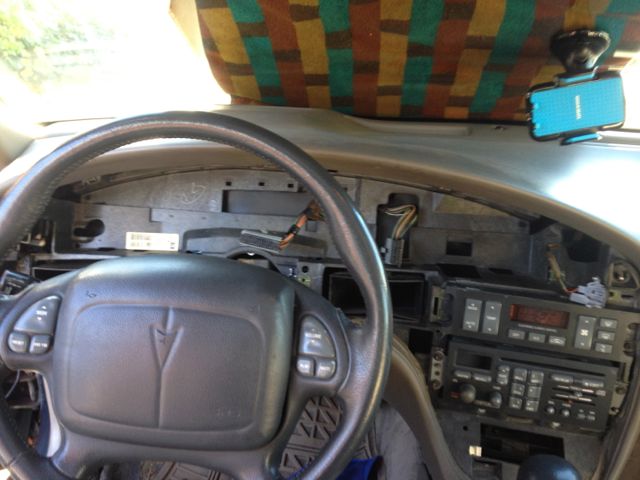
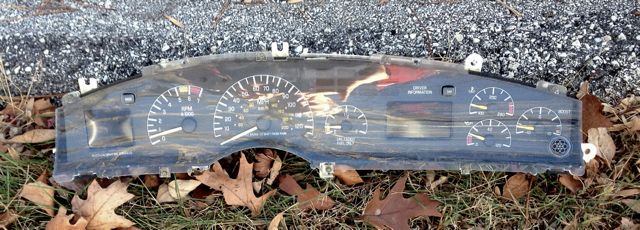
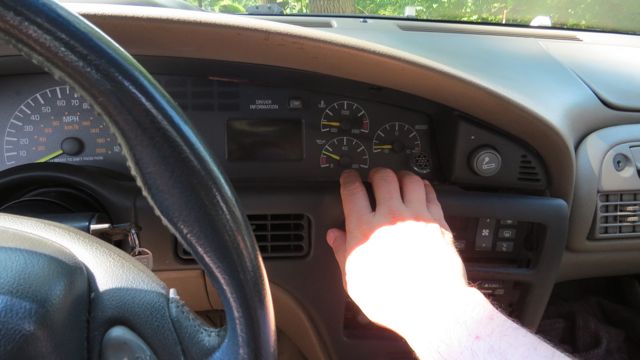
I've had an ongoing issue where my Driver Info Cluster fades on and off at will. Usually it's illuminated and more often it's "flaky" when the car is a little cold (not cold like weather but vehicle was just started) recently that has been exaggerated by some road bumps that make it go from on (yay) to off (boo) and usually it slowly self-repairs (??) Used to be a pat on the dashboard would relight it (compass and tach are also on or off at same time). My guess is loose connection somewhere.

(Scrolllll on down to see Photos of 1990's Bonneville SSEi Dashboard Instrument Cluster Removal Process and views Below)
Image
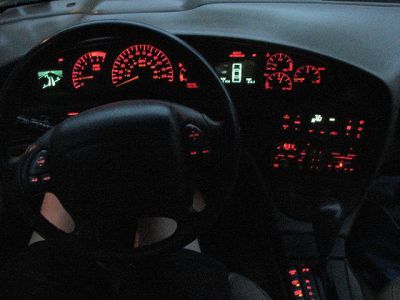
Photo shows Compass (left blue) and DIC (Right Blue) Illuminated.

I tried cleaning up the busses (my previous) post but this hasn't helped. Now something which may be unrelated (or maybe not) is quickly becoming intolerable. When the DIC flashes on it sometimes gets a dinging alert noise which goes away. Now the noise seems more rapid and isn't going away. (though good news is that I think it's holding the DIC in illuminated state while it's busy dinging. Since that may be oil or oil sensor related I add a little lube but it doesn't seem to be losing oil. How concerned should I be? Is it just annoying or does a steady and constant dinging mean I shouldn't be driving?

Any ideas?
Editing this post near the top so visitors know where it ends up (for the moment)
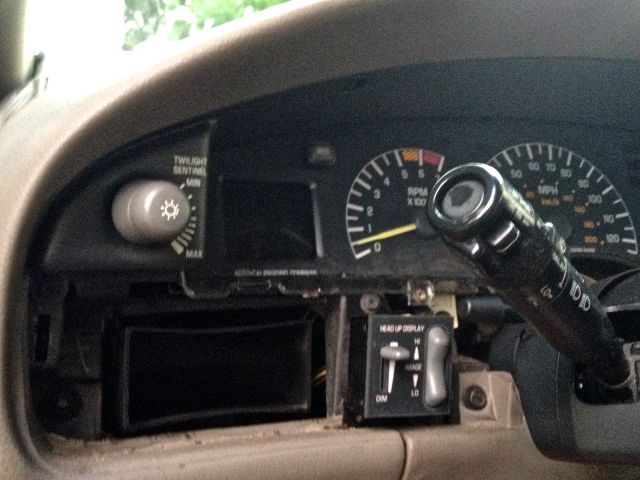
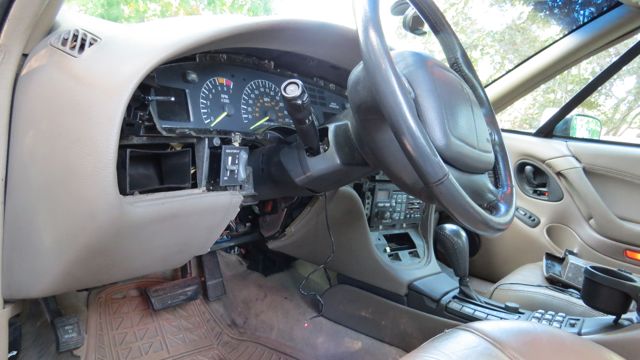
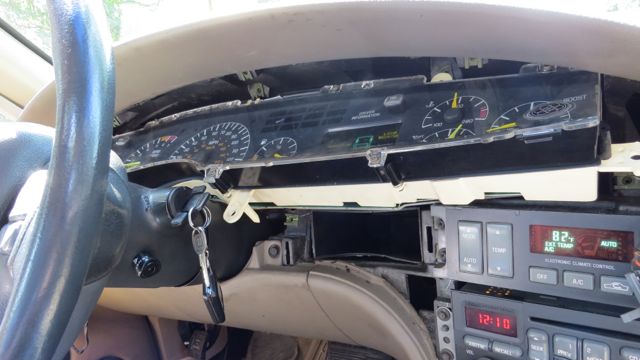
Someone else agreed and had experienced loose connections. I am in the process of taking out the cluster to check but keep hitting obstructions of one type or another. It does seem once I get the full cluster mostly exposed (see below) that I can find specific places where pressing or pulling makes the display illuminate or go dark. Currently I've nearly had the whole cluster out but the connector on the left side is hard to get at and I'd rather leave it flaky than push my luck and break the cluster or connector. One thing about plastic, when it breaks, it can be very - SUDDEN. After a couple of partial removals and replacement and tightening, and fiddling with the connection it has been considerably "more" reliable but still inconsistent. If I can get that last connector removed now that I know the process I feel it's a one hour ordeal to take it out and put it back. I think cleaning and re-crimping the connectors would completely fix it, though there could also be something wrong inside the cluster, not sure if that opens easily or not at all.
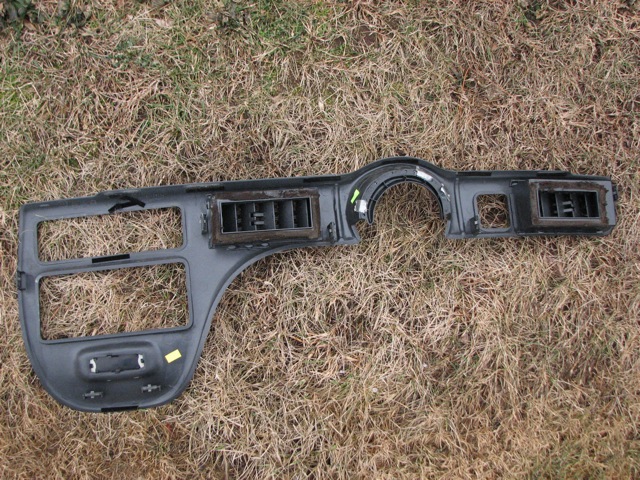
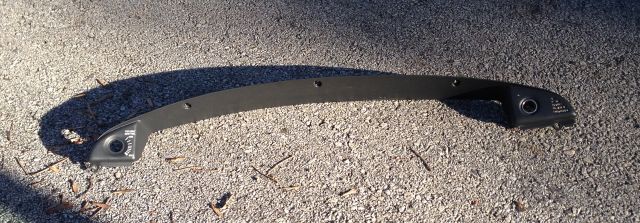
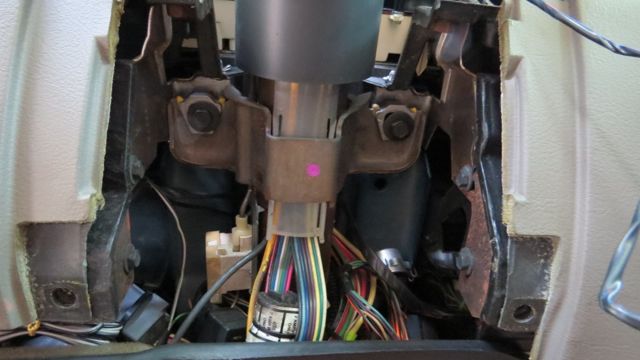
The premise: Remove the dashboard cover panel (has plastic snaps in 6 (7?) spots (images below). Remove light control knob (link below) Remove the upper dashboard cover (5 threaded fasteners) lighter clip, led lamp, remove the cluster fasteners (6?), Remove steering wheel lower valance cover (4 bolts, one fastener) Lower steering wheel about 1-1/2 inch (2 bolts). Slide out bottom to reach under for right side wire connector, stuck now on how to twist or access the left side connector? -

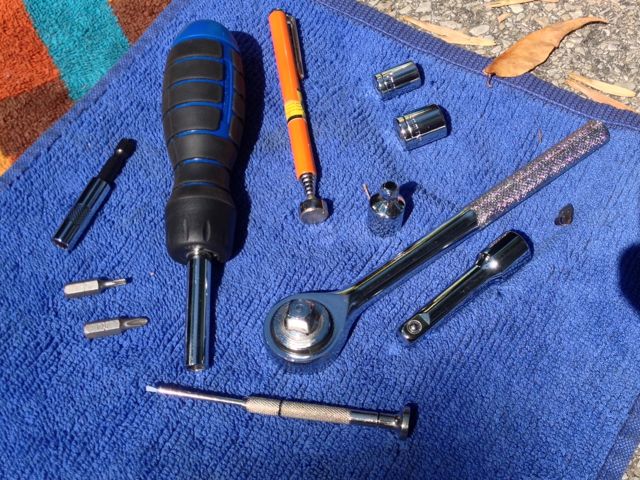
Tools used…

Image
The collection above, some are required or just good to have.
• Right angle ratchet wrench and 10mm, 13mm heads plus any required adaptors.
• A straight ratcheted driver also for the remainder of threaded fasteners: t-15 torx, #2 Phillips head tips.
• Magnet for holding fasteners was very handy with as many tight corners as this job features.
• Jewelers driver (for removing light control knob)

With the photos supplied I probably could have gotten in and out in well under an hour but as I'm documenting the journey it took several efforts (and putting it back together only to try again later). I also shot a tiny bit of W40 into the connector as a last resort as the DIC was still flickering when I was re-assembling the most recent attempt. Not sure exactly what worked or if it's a total fix but seemed near 98% this evening on my hour back and forth to labor day dinner. Let's hope I won't need to go back in.

I'm still not 100% satisfied in the results but maybe between all the tweaking of the connection and a little spritz of WD?

Last edited by jonnevilleSSEi on Sat Nov 21, 2015 8:27 pm, edited 7 times in total.
Image
'97 SSEi, Majestic Teal / Beige interior, Bose, HUD, iPod ready! - SOLD! :sad: Check it out!
'99 Buick Regal LSE, Matador Red / Beige interior - SOLD! Check it out!
'96 Chevy Camaro - White w/Black / fire red interior, 3800, manual, loaded, T-tops, Bose - SOLD! Check it out!
User avatar
jonnevilleSSEi
GXP Member
GXP Member
Posts: 278
Joined: Sat Dec 11, 2010 9:09 pm
Year and Trim: '97 SSEi
Location: Newtown Square, PA
Contact:

Re: Ringing Alert Sound - Flashing DIC & Compass 1997 SSEi

Post by jonnevilleSSEi »

Hey folks, just seeing if I can pop this back up if that's ok. Bonnie went to the garage this week but they can't locate anything. Is there an easy way to disable the chime? Car has lights and gauges, I think that's enough for me.

(or if anybody has other suggestions for what it may represent) - thanks - Happy 4th!
Image
'97 SSEi, Majestic Teal / Beige interior, Bose, HUD, iPod ready! - SOLD! :sad: Check it out!
'99 Buick Regal LSE, Matador Red / Beige interior - SOLD! Check it out!
'96 Chevy Camaro - White w/Black / fire red interior, 3800, manual, loaded, T-tops, Bose - SOLD! Check it out!
User avatar
MattStrike
Certified Bonneville Nut
Posts: 4760
Joined: Tue Aug 25, 2009 8:32 pm
Year and Trim: '99 Montana
'04 Dirtymax
'97 Camaro
'92 Trofeo
Location: SE Michigan

Re: Ringing Alert Sound - Flashing DIC & Compass 1997 SSEi

Post by MattStrike »

My vote is to the connections getting loose, or that the individual terminal(s) has a spring tab that may have taken a set or something. You'd have to remove the cluster to check for that, and while it's out is a good time to replace light bulbs and re-flow the solder joints for the connectors.
Boost addict
Image

The Fleet:
'93 SSEi - Twincharged + manual Build thread
'97 Camaro - Top swap
'05 STS - V8, AWD, her DD
'92 Trofeo - Fair weather DD
'99 Montana - top swap 3800
'04 Sierra 2500HD - LLY Duramax

Current project:
Something cool, trust me.

Upcoming projects:
'92 Bonneville SSE
'87 LeSabre T-type
'67 LeSabre

Gone to greener pastures:
'84 Sierra Classic - Twin turbo 3800
'97 LeSabre - Top swap

RIP:
'86 LeSabre - pictures
'93 SE - L67
User avatar
jonnevilleSSEi
GXP Member
GXP Member
Posts: 278
Joined: Sat Dec 11, 2010 9:09 pm
Year and Trim: '97 SSEi
Location: Newtown Square, PA
Contact:

Re: Ringing Alert Sound - Flashing DIC & Compass 1997 SSEi

Post by jonnevilleSSEi »

I hope I live long enough to have time to rewire the cluster. I suspect that is correct that getting behind the dash is required for this as it responds to odd combinations of road bumps to interfere with it and manual dash taps to re-luminate them. Simply a loose connection.

In other (good) news I was able to determine the source of the annoying chime dinging ring bell alert thing. The mechanic had fixed it prior to me knowing he'd solved the issue which was "low brake fluid" glad it didn't end up killing me! http://www.pontiacbonnevilleclub.com/fo ... 42083.html

IMPORTANT - If your 1992 - 1999 Pontiac Bonneville has an annoying chime that won't stop it could be because of LOW BRAKE FLUID!
Take that seriously, don't disconnect the chime wire to silence it as it could be that or something else of importance.
Image
'97 SSEi, Majestic Teal / Beige interior, Bose, HUD, iPod ready! - SOLD! :sad: Check it out!
'99 Buick Regal LSE, Matador Red / Beige interior - SOLD! Check it out!
'96 Chevy Camaro - White w/Black / fire red interior, 3800, manual, loaded, T-tops, Bose - SOLD! Check it out!
User avatar
haro1225
Posts like a Northstar
Posts: 1935
Joined: Thu May 22, 2008 11:38 pm
Year and Trim: 2004 GTO
Location: Lincoln Park, Mi
Contact:

Re: Ringing Alert Sound - Flashing DIC & Compass 1997 SSEi

Post by haro1225 »

There wasn't the red BRAKE light lit up on the dash? There should have been. Set the parking brake and see if it comes on.
Image
-Ryan
2004 GTO....LS1, LSA supercharged 525whp, 6MT
96 SSEi...September 2010 COTM........GONE
04 GTP comp G.... December 2015 COTM........GONE
2013 Audi Allroad Quattro
yourgrandma wrote:Hi.
User avatar
jonnevilleSSEi
GXP Member
GXP Member
Posts: 278
Joined: Sat Dec 11, 2010 9:09 pm
Year and Trim: '97 SSEi
Location: Newtown Square, PA
Contact:

Re: Ringing Alert Sound - Flashing DIC & Compass 1997 SSEi

Post by jonnevilleSSEi »

That is important, will look for it. Perhaps the brake indicator light is out?
Image
'97 SSEi, Majestic Teal / Beige interior, Bose, HUD, iPod ready! - SOLD! :sad: Check it out!
'99 Buick Regal LSE, Matador Red / Beige interior - SOLD! Check it out!
'96 Chevy Camaro - White w/Black / fire red interior, 3800, manual, loaded, T-tops, Bose - SOLD! Check it out!
User avatar
haro1225
Posts like a Northstar
Posts: 1935
Joined: Thu May 22, 2008 11:38 pm
Year and Trim: 2004 GTO
Location: Lincoln Park, Mi
Contact:

Re: Ringing Alert Sound - Flashing DIC & Compass 1997 SSEi

Post by haro1225 »

It's possible that the bulb is out. But yeah, low brake fluid or the parking brake will cause the light and the dinging.
Image
-Ryan
2004 GTO....LS1, LSA supercharged 525whp, 6MT
96 SSEi...September 2010 COTM........GONE
04 GTP comp G.... December 2015 COTM........GONE
2013 Audi Allroad Quattro
yourgrandma wrote:Hi.
SATADrive420
SLE Member
SLE Member
Posts: 48
Joined: Tue Oct 22, 2013 9:55 pm
Year and Trim: 1998 Bonneville SE
Location: Lansing, Michigan
Contact:

Re: Ringing Alert Sound - Flashing DIC & Compass 1997 SSEi

Post by SATADrive420 »

The gauge cluster pins are probably flaky and not making a good connection to the pins on the cluster. I ran into this problem when I was upgrading my cluster. What I did was I took the individual pins out of the connector and squeezed them down a little.
1998 Pontiac Bonneville SE with XM Radio, Heated Seats and more! (Retired)
2009 Chevrolet Impala LTZ (Daily Driver)
User avatar
jonnevilleSSEi
GXP Member
GXP Member
Posts: 278
Joined: Sat Dec 11, 2010 9:09 pm
Year and Trim: '97 SSEi
Location: Newtown Square, PA
Contact:

Re: Ringing Alert Sound - Flashing DIC & Compass 1997 SSEi

Post by jonnevilleSSEi »

SATADrive420 (nice handle mate!) is probably right on from what my gut tells me. Must be a heck of a job getting to those pins though? (if it isn't let me know how to get there). As far as a brake warning light, I experimented by setting the parking/emergency brake and guess what. No lamp! Apparently there should have been a BRAKE lamp in the info cluster but that's also not working. I think the panel needs to be removed and connections somehow tightened/cleaned synched up. Anyone know of a post on removing and replacing the instrument cluster on the 92~99's?
Image
'97 SSEi, Majestic Teal / Beige interior, Bose, HUD, iPod ready! - SOLD! :sad: Check it out!
'99 Buick Regal LSE, Matador Red / Beige interior - SOLD! Check it out!
'96 Chevy Camaro - White w/Black / fire red interior, 3800, manual, loaded, T-tops, Bose - SOLD! Check it out!
User avatar
haro1225
Posts like a Northstar
Posts: 1935
Joined: Thu May 22, 2008 11:38 pm
Year and Trim: 2004 GTO
Location: Lincoln Park, Mi
Contact:

Re: Ringing Alert Sound - Flashing DIC & Compass 1997 SSEi

Post by haro1225 »

I replaced mine a long time ago, it's not hard from what I remember. Remove the trim and all the screws, then loosen the bolts that hold the steering column on just to get some clearance. While its out look into replacing all the bulbs.
Image
-Ryan
2004 GTO....LS1, LSA supercharged 525whp, 6MT
96 SSEi...September 2010 COTM........GONE
04 GTP comp G.... December 2015 COTM........GONE
2013 Audi Allroad Quattro
yourgrandma wrote:Hi.
User avatar
jonnevilleSSEi
GXP Member
GXP Member
Posts: 278
Joined: Sat Dec 11, 2010 9:09 pm
Year and Trim: '97 SSEi
Location: Newtown Square, PA
Contact:

Re: Ringing Alert Sound - Flashing DIC & Compass 1997 SSEi

Post by jonnevilleSSEi »

Finally found a few moments to take the plunge and look behind the fascia.

I'm willing but not experienced at that type of dis-assembly and assembly, any suggestions for a noob? I recall taking the stereo out and the trick was inverting it in order to have better access to wire clips. Any tips and tricks for accessing and removing the dashboard cluster? How long do you think it would take someone unfamiliar with the details? Tools? I have a flight of steps from the tools to the car so being prepared is a big plus. - thanks. I'll send back photos after the big adventure. …
Tools so far include only a Torx T-15 driver and a #2 (Large) Phillips head driver - and being able to pull off the plastic dash cover.
This is what I discovered.
Image
After pulling the face panel off (just pries off with fingers but be careful with it, if it cracks, don't even know if or how you'd replace it.) But mine feels solid, 7 clips snap it on and off.
Image
From here a bunch of 6 point star bolts (I have the driver, will return to provide the exact size spec) and a couple of medium phillips heads guard the next step. I can see "mystic teal" peering at me so this doesn't go much deeper.
Image
Also had a great Eureka moment discovering a point on clear plastic lens directly below the right side LED display (The DIC - not compass) where pressing in shorted the connection and pulling out a little seemed to stabilize it. By Jove I feel pretty good about that. Like I located the rat, now I just need to get at it.
Image
Now I'll see if my gentle stretching helped at all, most likely I'll need to go back in deeper and see where the contact is made and how I can make it solid. I saw a few main parts, a top plastic bezel that includes surrounds for the light switch and lighter housings, the plastic lens covering the whole assembly and the assembly itself. Do these come out after removing the fasteners?

Image
Upper bezel from above the instrument cluster is next to go. The lighter also needs to be unclipped and in my case there is also a small flasher indicating the alarm being set which just slides out.

Image
You'll also need to remove the panel below the steering wheel column (4 bolts using 10mm ratchet)

Image
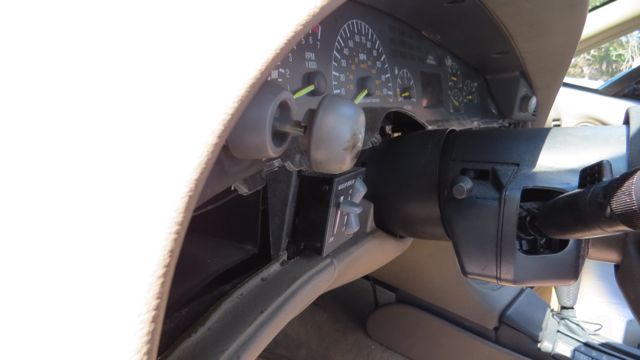
That gets you there, then these are the two 13mm bolts to loosen and lower the column. They're pretty long fasteners, I didn't measure but turned for a while and probably lowered them about half an inch or so. Be careful here, don't want to drop the column all the way by mistake.

Image
You'll see more details below in this post detailing how you'll need to remove a panel below the steering column so you can lower it and make enough room to get the instrument cluster out. There is also a link below to another article on Pontiac Bonneville Club detailing removal of the light switch.

Image
The panel removed (held on by 7 plastic tabs with phillips head fasteners). Only remove the fasteners from the white clips, the others hold the plastic screen on the cluster and you can remove the cluster with that in place. In fact, you want to do that to keep it protected.

Image

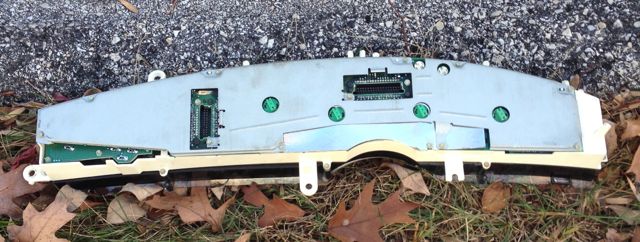
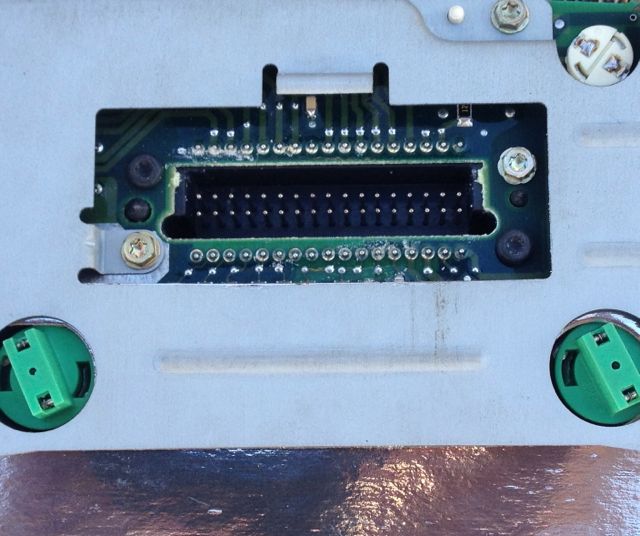
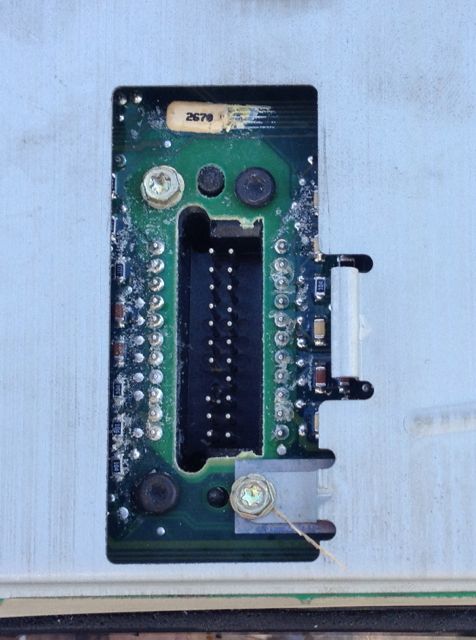
The connectors (above and details below) may be the source of the problem. I see mild electrical corrosion. Cleaned them a bit but today's exercise was primarily removal of the cluster. I'm not ready to disassemble the cluster itself yet to clean it thoroughly. Sort of wishing I'd taken the time to clean them better than I did but they got a few seconds with a wire (brass) brush and a little spritz of the WD. We'll see if they show some improvement. Here's to keeping the lights on. - wish me luck.

Image

Image
The starboard side connector also seems to have one of the pins "bent" (4 up from bottom on left) I'm pretty confident I didn't do that, and it doesn't seem to directly affect performance but I don't know what's up with that?

ps: even more pics below, may as well view the whole set if you're about to go here for the first time.
Last edited by jonnevilleSSEi on Sat Nov 21, 2015 8:20 pm, edited 4 times in total.
Image
'97 SSEi, Majestic Teal / Beige interior, Bose, HUD, iPod ready! - SOLD! :sad: Check it out!
'99 Buick Regal LSE, Matador Red / Beige interior - SOLD! Check it out!
'96 Chevy Camaro - White w/Black / fire red interior, 3800, manual, loaded, T-tops, Bose - SOLD! Check it out!
User avatar
jonnevilleSSEi
GXP Member
GXP Member
Posts: 278
Joined: Sat Dec 11, 2010 9:09 pm
Year and Trim: '97 SSEi
Location: Newtown Square, PA
Contact:

Re: Ringing Alert Sound - Flashing DIC & Compass 1997 SSEi

Post by jonnevilleSSEi »

Now I'm stuck on the light switch itself. I can get every other obstruction clean except the light switch. I don't want to tug too hard and break it but suspect it's just a matter of giving the plastic knobs a good clean tug so I can remove the upper plastic cover. I don't want to snap it and learn the hard way.
OK, I found this post (thanks Sonoma) http://www.pontiacbonnevilleclub.com/fo ... 22272.html which should help me get that plastic trim removed so I can (hopefully no further obstructions) remove the instrument cluster and find out where the loose connection resides. Appears that a thin screwdriver from the bottom of the knowb and pressure in the correct direction will cleanly remove the knob so I can remove the trim, so I can remove the cluster...
OK, so at it "again" with the dashboard. This time prepared (thanks to link above) to remove the lightswitch and get that cluster out where I can see it. Sadly, once again, ended up going only a bit further but learning and seeing each time and getting there (maybe…)
:dontknow:
Here's what I have now though.
Wanted to include a nice photo showing the first step at removing the dashboard panel cover. For those timid about this step, go with caution. I've been lucky (and perhaps skilled?) at this and have done it now NUMEROUS times. Be careful but a slow tug on this part (to the right of the wheel) gets it started and the rest just POP out as you pull. maybe 6 or 7 tabs will pop as you remove the panel and they just pop back in when complete.

Image

Once the panel is removed, I NOW discovered the difference between removing the plastic clear cover and the cluster itself. No need to remove the cover to get the cluster out (fixing it ultimately may be another tale though)

The tab in the light switch is accessible from the side, here is what it looks like before the switch is removed. And you can see the link to the removal above from Sonoma.

Image

Challenge for me today was that once everything (else) is out of the way, the cluster is still wedged in there and I don't want to twist it to remove it.

Image

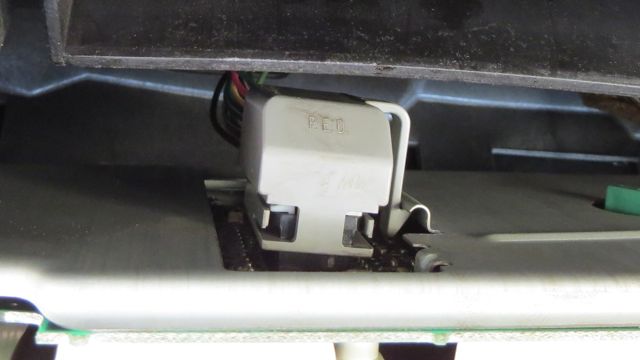
But I was able to see the connector which I believe will lead to the source of my troubles. (Photo is from underneath the cluster and is a picture of the back of the cluster) Challenge for me now is not being able to tell if the problem is the clip, the wires, or something in the cluster where perhaps solder has loosened. But I will say this, getting closer!!

Image

It would be great if it's just fiddling with the clip and a needle-nose plier to tighten it up, and it does feel a bit loose.
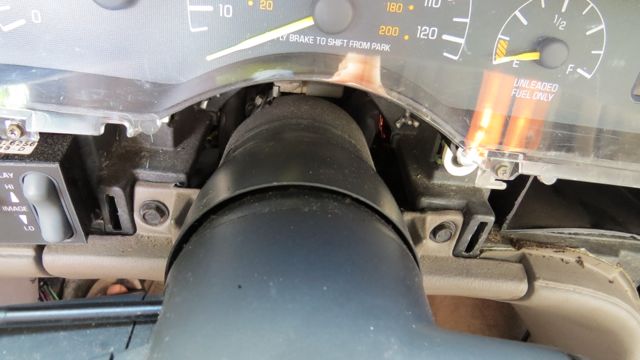
It was suggested above to loosen the steering wheel bolts, you mean these two? Again, forgive me for being timid but I need this as my daily driver so I'm not risking big learning if I can avoid it. I do guess that loosening or removing these bolts may allow the steering wheel to rest so I can remove and see the full cluster without twisting it or cracking it. If there is anyone who's been and done, please share lessons learned.

Image
Image
'97 SSEi, Majestic Teal / Beige interior, Bose, HUD, iPod ready! - SOLD! :sad: Check it out!
'99 Buick Regal LSE, Matador Red / Beige interior - SOLD! Check it out!
'96 Chevy Camaro - White w/Black / fire red interior, 3800, manual, loaded, T-tops, Bose - SOLD! Check it out!
SATADrive420
SLE Member
SLE Member
Posts: 48
Joined: Tue Oct 22, 2013 9:55 pm
Year and Trim: 1998 Bonneville SE
Location: Lansing, Michigan
Contact:

Re: Ringing Alert Sound - Flashing DIC & Compass 1997 SSEi

Post by SATADrive420 »

I had to pull the cluster out of my SE a few times when I was converting over to the SSE cluster.
To remove the cluster, you have to tilt the wheel all the way down, and pull the bottom out first, like what you did in this photo. Oh, and make sure the key is out.Image

Then, you have to reach behind, feel for the clip on the connectors, and pull them out. They will be in there tight if you haven't removed them before. After the cluster is unplugged, pull the side with the boost gauge towards you and it should just come right out. It probably will scrape the top of the steering column cover, but at least the cluster will be out.
1998 Pontiac Bonneville SE with XM Radio, Heated Seats and more! (Retired)
2009 Chevrolet Impala LTZ (Daily Driver)
User avatar
jonnevilleSSEi
GXP Member
GXP Member
Posts: 278
Joined: Sat Dec 11, 2010 9:09 pm
Year and Trim: '97 SSEi
Location: Newtown Square, PA
Contact:

Re: Ringing Alert Sound - Flashing DIC & Compass 1997 SSEi

Post by jonnevilleSSEi »

Thanks SataDrive420. So those two bolts to the left and right of the steering column won't help?
And btw - yesterday's drive to work (45 minutes) darkened once just after starting but stayed illuminated the whole drive following. Think I'm on the right track now (finally!!)
You can do anything if you have the skill and the tools do to the task.
(and the time, don't forget we also need time - this could have been finished months ago.
Image
'97 SSEi, Majestic Teal / Beige interior, Bose, HUD, iPod ready! - SOLD! :sad: Check it out!
'99 Buick Regal LSE, Matador Red / Beige interior - SOLD! Check it out!
'96 Chevy Camaro - White w/Black / fire red interior, 3800, manual, loaded, T-tops, Bose - SOLD! Check it out!
User avatar
haro1225
Posts like a Northstar
Posts: 1935
Joined: Thu May 22, 2008 11:38 pm
Year and Trim: 2004 GTO
Location: Lincoln Park, Mi
Contact:

Re: Ringing Alert Sound - Flashing DIC & Compass 1997 SSEi

Post by haro1225 »

Those bolts hold the trim piece on, but if you take it off there are two bolts that hold the steering column in place. They face down. Loosen them but don't take them all the way out for a little bit more clearance.
Image
-Ryan
2004 GTO....LS1, LSA supercharged 525whp, 6MT
96 SSEi...September 2010 COTM........GONE
04 GTP comp G.... December 2015 COTM........GONE
2013 Audi Allroad Quattro
yourgrandma wrote:Hi.
User avatar
jonnevilleSSEi
GXP Member
GXP Member
Posts: 278
Joined: Sat Dec 11, 2010 9:09 pm
Year and Trim: '97 SSEi
Location: Newtown Square, PA
Contact:

Re: Ringing Alert Sound - Flashing DIC & Compass 1997 SSEi

Post by jonnevilleSSEi »

Those bolts (FYI) are 2 of 4 of the 10mm bolts, two others on bottom of valance panel AND a more hidden threaded fastener also involved. (use the phillips #2 for that one) then the two (13mm) bolts for loosening the steering column are behind that facing straight up.
Image
That gets you there, then these are the two to loosen the column.
Image
Image
'97 SSEi, Majestic Teal / Beige interior, Bose, HUD, iPod ready! - SOLD! :sad: Check it out!
'99 Buick Regal LSE, Matador Red / Beige interior - SOLD! Check it out!
'96 Chevy Camaro - White w/Black / fire red interior, 3800, manual, loaded, T-tops, Bose - SOLD! Check it out!
Post Reply