

Steering wheel radio controls

Steering wheel radio controls
This is my second post to this great forum. Just bought a 94 SSEi. Already solved one problem with help from the forum, so here's a couple more: the steering wheel radio controls do not work, just the ones on the dash. Could there be a fuse for this, or is it in the steering column? Also, can't play CDs, as I get an error message. Do CD cleaning discs work? I know these two problem are not related but I thought I wouldn't take up 2 posts for these questions. Can anybody help? (FYI, the car has only 44k actual miles). Thanks to all in advance!
-
Bob Dillon
- Retired Gearhead

- Posts: 1854
- Joined: Wed May 21, 2008 9:38 pm
- Year and Trim: 1997 SE Anniversary Edition
Re: Steering wheel radio controls
If you decide you need the controls, I have a box of interior stuff all boxed up to send for the shipping, which is $17.90. Got a lot of other interior stuff in there, but you don't get to choose-take it all or none. 
P.S. they need to be touched up with gray spray paint. Let me know. Contents of box:
http://www.pontiacbonnevilleclub.com/fo ... 44302.html
P.S. they need to be touched up with gray spray paint. Let me know. Contents of box:
http://www.pontiacbonnevilleclub.com/fo ... 44302.html
462 cubic inches of REAL Pontiac power.
Re: Steering wheel radio controls
thanks… but don't think I need any of that stuff you have 
-
MattStrike

- Certified Bonneville Nut

- Posts: 4760
- Joined: Tue Aug 25, 2009 8:32 pm
- Year and Trim: '99 Montana
'04 Dirtymax
'97 Camaro
'92 Trofeo - Location: SE Michigan
Re: Steering wheel radio controls
Was the CD player stereo unit stock for the '94? You might have one of the later CD player stereo's (how many equalizer sliders does it have?) which does not work with the older steering wheel controls.
My experience is that once the player stops reading CD's it needs to be repaired or replaced, I've never really tried to repair one. Cheapest option is to grab one out of the junkyard, sometimes you even get a free CD that way.
My experience is that once the player stops reading CD's it needs to be repaired or replaced, I've never really tried to repair one. Cheapest option is to grab one out of the junkyard, sometimes you even get a free CD that way.
Boost addict

The Fleet:
'93 SSEi - Twincharged + manual Build thread
'97 Camaro - Top swap
'05 STS - V8, AWD, her DD
'92 Trofeo - Fair weather DD
'99 Montana - top swap 3800
'04 Sierra 2500HD - LLY Duramax
Current project:
Something cool, trust me.
Upcoming projects:
'92 Bonneville SSE
'87 LeSabre T-type
'67 LeSabre
Gone to greener pastures:
'84 Sierra Classic - Twin turbo 3800
'97 LeSabre - Top swap
RIP:
'86 LeSabre - pictures
'93 SE - L67
The Fleet:
'93 SSEi - Twincharged + manual Build thread
'97 Camaro - Top swap
'05 STS - V8, AWD, her DD
'92 Trofeo - Fair weather DD
'99 Montana - top swap 3800
'04 Sierra 2500HD - LLY Duramax
Current project:
Something cool, trust me.
Upcoming projects:
'92 Bonneville SSE
'87 LeSabre T-type
'67 LeSabre
Gone to greener pastures:
'84 Sierra Classic - Twin turbo 3800
'97 LeSabre - Top swap
RIP:
'86 LeSabre - pictures
'93 SE - L67
Re: Steering wheel radio controls
Thanks MattStrike . . . this is original equipment . . . the owner had the window sticker showing it, and it's a delco unit, and never been replace. I think the CD and the controls are two separate issue. Thanks again for you knowledge!
-
Sirius

- Resident Gearhead

- Posts: 2143
- Joined: Thu May 22, 2008 10:40 am
- Year and Trim: 2003 SSEi
- Location: West Point
Re: Steering wheel radio controls
There is a fix for the non-functioning steering wheel controls that involves using toothpicks under the buttons. Do a search in tech info or a general search on toothpick and see what comes up. I had to do this on my 93 years ago and it actually works.
And, yes, the lack of steering wheel control and an inoperable CD player are likely unrelated.
And, yes, the lack of steering wheel control and an inoperable CD player are likely unrelated.
Resident Tightwadgweg_b wrote:People think I'm nuts, but Matt proved it.

Screw you, Photobucket.
Re: Steering wheel radio controls
Thanks Sirius!
-
harofreak00
- Administrator

- Posts: 26022
- Joined: Mon May 19, 2008 6:04 pm
- Year and Trim: 2004 GXP - plus a handful of other Bonnevilles
- Location: Browerville, MN
- Contact:
Re: Steering wheel radio controls
http://www.pontiacbonnevilleclub.com/fo ... c1692.html

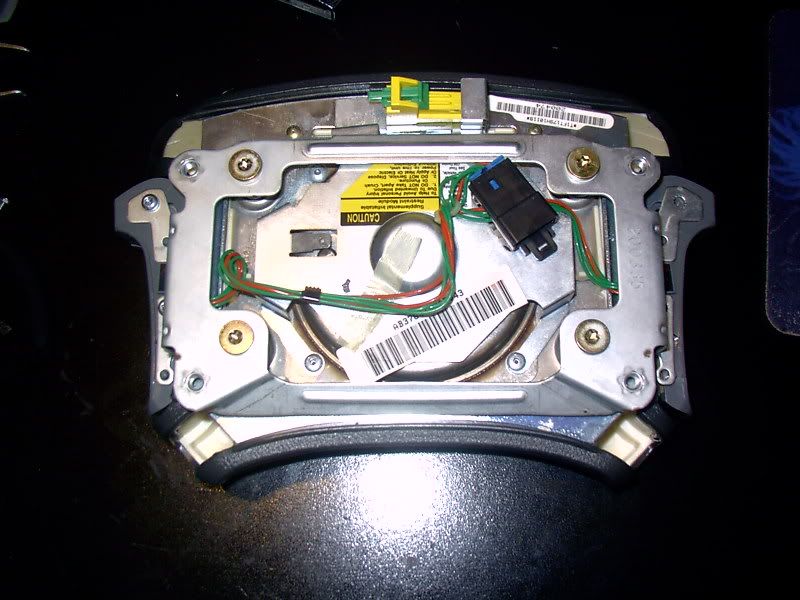
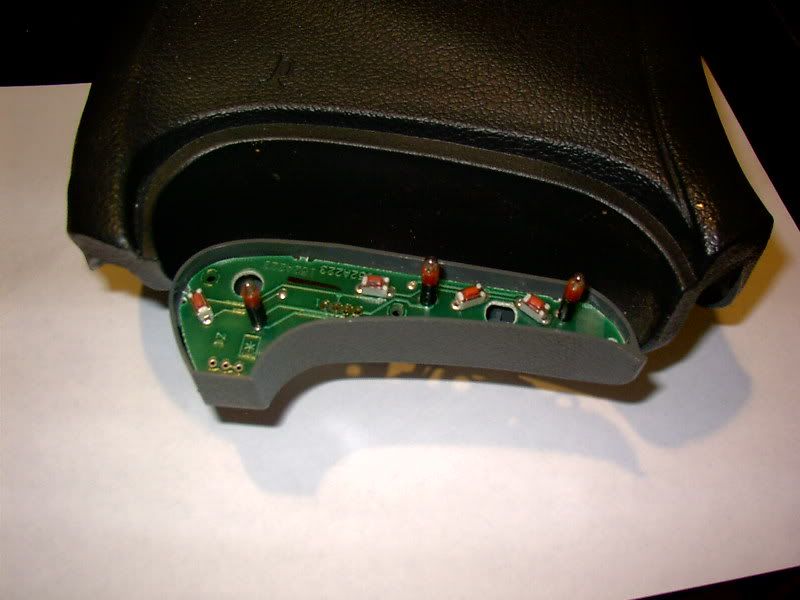
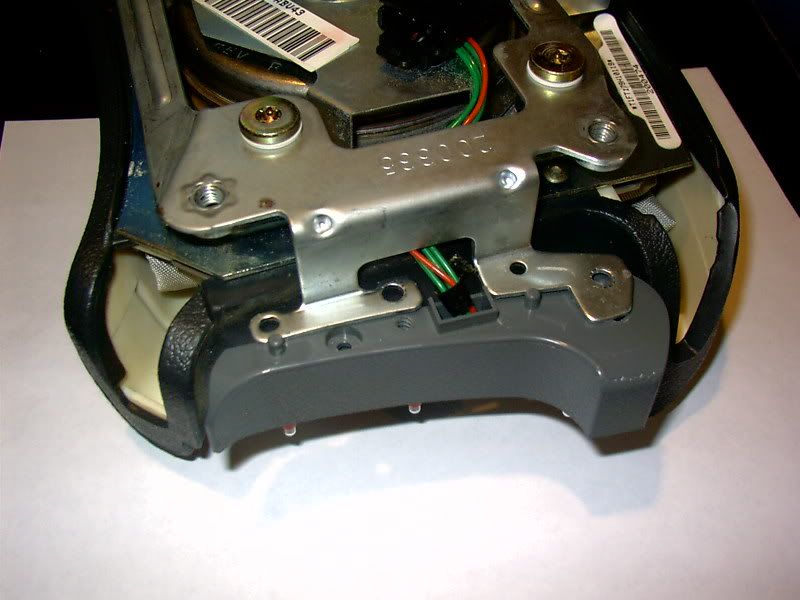
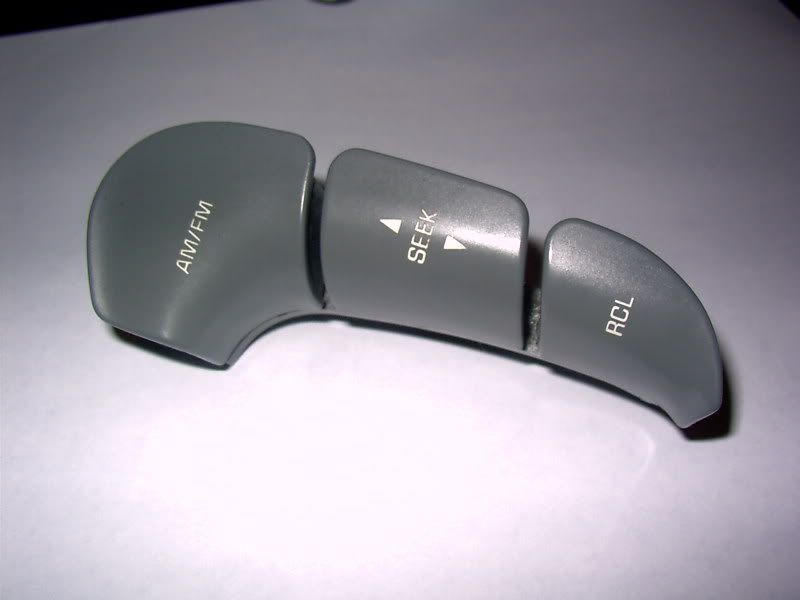
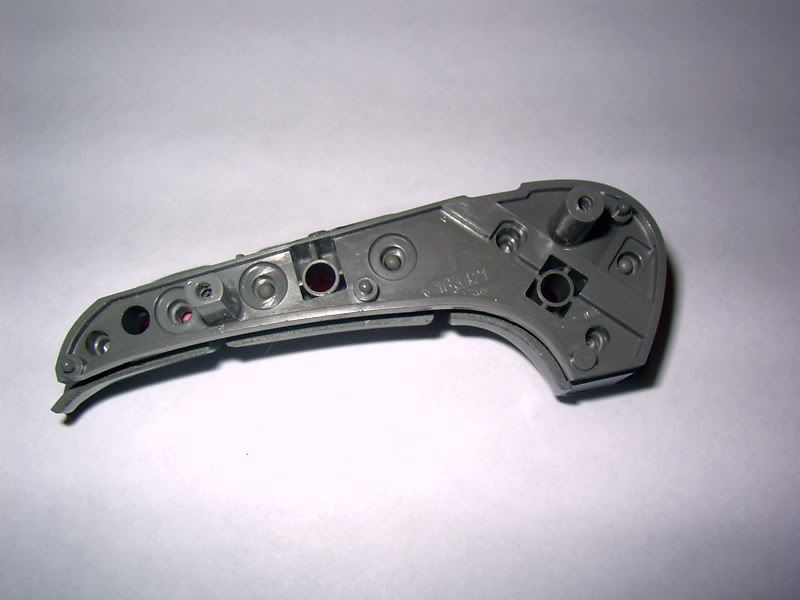
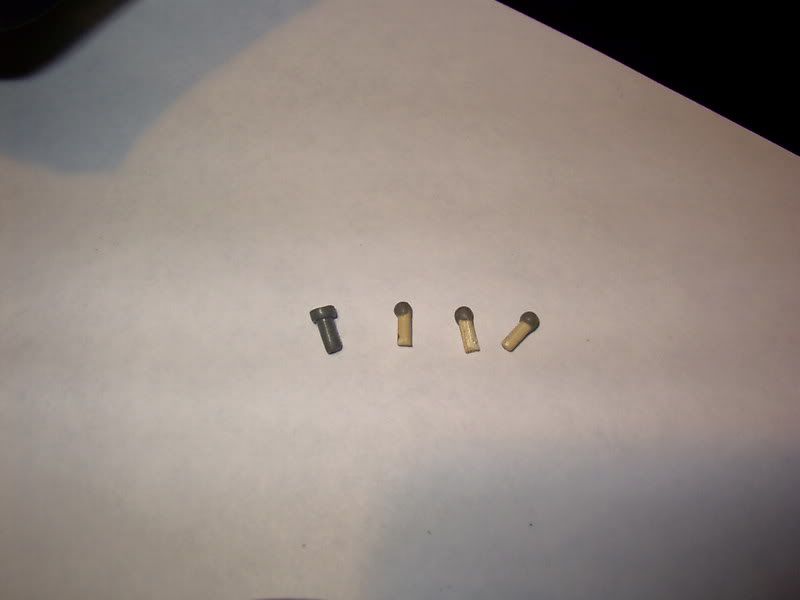
92-95 Steering wheel controls fix
For those who have 'mushy' controls, non-working controls, or controls that seem to degrade their sensitivity with higher temperatures, this procedure is for you:
To remove the controls:
1. Disconnect the negative battery cable.
2. Pull the SIR fuse from the main fuse panel.
3. Remove 4 torx screws from back of steering wheel.
4. Disconnect the horn, stereo control, and SIR connectors.
NOTE: Disconnect the copper spade terminal from the back of the airbag assembly when disconnecting the horn. The other end (down in the column) is very fragile and brittle.
5. Remove the airbag assembly.
6. Remove the backing plate from the airbag assembly (4 screws to the assembly, 2 each to each stereo control pod).
At this point, you can remove the piece of tape on the control harness, and you have both pods and the harness seperated. Remove the 2 nuts on each assembly VERY carefully. DON'T open the pods yet.
At this point, you have a decision to make. Repair the old rubber pins, or replace them with round toothpicks. If you're going back to nature with the wood, cut round toothpicks to the same length as the rubber pins. Cut both tapered ends off in the process. If you're repairing the original rubber pins, follow on:
Get something like a large bowl to open the pods over. Small parts like to drop out. After opening the pods, you'll see 4 small rubber pins in the button half of the assembly. These need to be removed. Gently tap them upside down, if that doesn't work, use a straight pin to gently coax them out, but only from the small center hole, not the outer perimeter.
After all 8 pins have been removed, inspect the small end for 'mushrooming' or fraying. Carefully trim any of this off, leaving a small chamfer around the small end face. Clean all 8 pins with rubbing alcohol, and wash your hands. No oils or grease for awhile.
Mix up a small batch of JB weld or similar epoxy that is known to work on rubber. Gently dip the small end of each rubber pin in the jb weld, and stand them upright to dry. Don't allow any of the epoxy to drip down the sides of the pins, or they won't fit back in the pods later.
Also apply a small amount of jb weld to the microswitches in the pods. All 8 of them.
What you've just done is made up for any shrinkage, and prevented them from 'giving' too much when depressed. Wait a full 6 hours for the jb weld to fully cure. Prior to assembly, lightly coat each pin with a silicone or Teflon lubricant that is known to work on plastic and rubber parts.
Re-assemble in the reverse order.
My controls are very crisp and responsive now, and are no longer affected by cockpit temps. No more 50 ft/lb mashing of the buttons. I can feel a crisp 'click' each time I use them now.
Andrew - owner/operator of Bonnevilles Unlimited

2004 Bonneville GXP | 60k | White Gold Tricoat | custom built supercharged 3800 hot rod | garage queen
1997 Corvette | 57k | Silver Metallic | Z06 wheels | Date-night Hauler/Parts runner
2014 Town & Country Limited | Cashmere Pearl | 115k | Family Hauler
2002 Ram 1500 Quad Cab Sport | Black| 280k | Official Bonneville Hauler
2004 Bonneville GXP | 60k | White Gold Tricoat | custom built supercharged 3800 hot rod | garage queen
1997 Corvette | 57k | Silver Metallic | Z06 wheels | Date-night Hauler/Parts runner
2014 Town & Country Limited | Cashmere Pearl | 115k | Family Hauler
2002 Ram 1500 Quad Cab Sport | Black| 280k | Official Bonneville Hauler
Re: Steering wheel radio controls
Thanks harofreak00.
This type of work is way above my head!!!!
I will get the CD to work (hopefully) and have to live with the dash controls it seems!
This type of work is way above my head!!!!
I will get the CD to work (hopefully) and have to live with the dash controls it seems!