Page 1 of 2
Splicing an AUX input into the CD player wiring
Posted: Tue Jan 29, 2013 2:34 pm
by lilstrom13
Okay, I have a 2003 Bonneville SE, and I'm looking to do a custom AUX input, because of the weird wiring on the back of these radios:
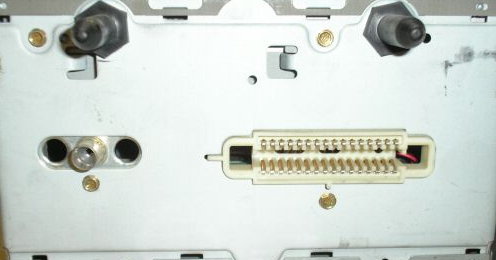
I've done quite a bit of research, and even looked inside the radio, and the wiring looks the same as this write-up:
http://ls1tech.com/forums/stereo-electr ... apter.html

I was wondering if anyone knows if the wiring looks like the same plug on my radio, can I assume the LEFT and RIGHT channels are going to be the same wires? It looks identical, 13 white wires, 1 black wire.
I am thinking about attempting it this weekend, and any help would be greatly appreciated.
Thanks,
lilstrom13
Re: Splicing an AUX input into the CD player wiring
Posted: Tue Jan 29, 2013 8:46 pm
by MattStrike
You also need to identify the ground. At the very least, you need a DMM to find any of those wires that reads 6v (give or take 0.5v), any of those are candidates for the audio ground and left/right channels (not to be confused with the chassis ground, true 0v). Use a pair of cheap earbuds or headphones, to locate which is the audio ground and which are L/R.
That means, the unit has to be powered up. I recommend using a spare unit if possible, but I've never bricked any that I've messed with.
The problem with this method, is that the CD player has to be working, and reading a CD in order to inject your aux input signal. So with constantly using the player it might only last a few years.
Now, if you open up your radio and it has a separate AM/FM module (like the '95+ did) you can use the same procedure (finding the 6v connections) to identify the audio signal from the FM module, which is the default audio on the older stereos. That was how I found my audio signals for this guide:
Here. Once you identify the audio output, you can follow the pcb tracings (use a dmm to verify) to follow the trace to the surface mount micro-controller that controls which audio signal gets handed to the amp. All the audio signals will go to this chip, which should help identify which 6v connections for the am/fm board are the audio signal.
It would be good if the '00+ could be hacked, clean source signal for anybody with the patience to learn to solder!
Re: Splicing an AUX input into the CD player wiring
Posted: Wed Jan 30, 2013 3:01 am
by 00Beast
Re: Splicing an AUX input into the CD player wiring
Posted: Wed Jan 30, 2013 10:41 am
by MattStrike
Yeah, but what does that adapter cost? $90?
Re: Splicing an AUX input into the CD player wiring
Posted: Wed Jan 30, 2013 11:24 am
by 00Beast
You don't need to use the iPac, you can just use a generic 3.5mm "aux-in" cable.
Re: Splicing an AUX input into the CD player wiring
Posted: Wed Jan 30, 2013 11:45 am
by lilstrom13
MattStrike wrote:You also need to identify the ground. At the very least, you need a DMM to find any of those wires that reads 6v (give or take 0.5v), any of those are candidates for the audio ground and left/right channels (not to be confused with the chassis ground, true 0v). Use a pair of cheap earbuds or headphones, to locate which is the audio ground and which are L/R.
It would be good if the '00+ could be hacked, clean source signal for anybody with the patience to learn to solder!
Thanks for all the great info, I was 100% on the fence about it being the same layout of wires, and I will for sure have to use the headphones method to check the sound outputs. I assume i would get the normal audio if i find the L/R channels, but what am I listening for when im trying to locate the ground? Dead silence? More audio?
How exactly do I test them? I've heard you strip the headphone jack off the end of some headphones, put the ground wire to the chassis, and one of the other wires to the pins where the white cables are, is this correct?
As far as the other method, involving taking the whole dash apart and wedging myself in the windshield, I don't think I want to go that far into it, seems like a royal pain in the @$$ lol. But thanks for the input(and the pictures, which will definitely help me get the radio out of the dash).
Joe
Re: Splicing an AUX input into the CD player wiring
Posted: Wed Jan 30, 2013 4:32 pm
by MattStrike
So - important note - the audio signal rides on a 6v 'plane' if you will. Do not connect the headphone ground to the radio chassis, it will blow the phone coil when you touch it to the audio signal.
What you do is identify each wire/connection that measures 6v to the chassis with a dmm. Those are the candidates for being the audio L/R & Gnd. After that, it's guess and check. When you head audio over the earphone, you've located a L or R signal. It should sound crisp, clean, and no fuzzyness. L and R usually sit next to each other.
Re: Splicing an AUX input into the CD player wiring
Posted: Wed Jan 30, 2013 5:47 pm
by MattStrike
00Beast wrote:You don't need to use the iPac, you can just use a generic 3.5mm "aux-in" cable.
Don't you still need something on the serial line to get the stereo to switch over?
Re: Splicing an AUX input into the CD player wiring
Posted: Wed Jan 30, 2013 6:12 pm
by 00Beast
No, you shouldn't.
Re: Splicing an AUX input into the CD player wiring
Posted: Wed Jan 30, 2013 8:49 pm
by MattStrike
Huh. Well, that should make things easy. Is that how all the stereos are?
Re: Splicing an AUX input into the CD player wiring
Posted: Thu Jan 31, 2013 10:40 am
by lilstrom13
00Beast wrote:You don't need to use the iPac, you can just use a generic 3.5mm "aux-in" cable.
I read that thread pretty thoroughly, and I'm thinking I'm going to do that. But quick question, it says(the last post) that you have to have the XM module for this to work. My car doesn't have XM, or a CD changer, is it still going to work for me?
Thanks for the help guys.
Re: Splicing an AUX input into the CD player wiring
Posted: Thu Jan 31, 2013 3:43 pm
by 00Beast
You have to take the dash apart and add the pins like the thread shows.
Re: Splicing an AUX input into the CD player wiring
Posted: Thu Jan 31, 2013 5:58 pm
by lilstrom13
00Beast wrote:You have to take the dash apart and add the pins like the thread shows.
Ahh okay, I get it, if I had XM, the pins would be there, so i just add them myself.
Also, you say ANY old AUX cable will work? Like this:
http://www.radioshack.com/product/index ... =CT4379539
Also, where would you recommend picking up those pins for the plug/wires?
Thanks again for everything.
Joe
Re: Splicing an AUX input into the CD player wiring
Posted: Sat Feb 02, 2013 6:06 pm
by 00Beast
That cord should work.
I have no idea where to get the pins. Amazon maybe?
Re: Splicing an AUX input into the CD player wiring
Posted: Sat Feb 02, 2013 9:31 pm
by MattStrike
Junkyard works too.
There are some places online that sell kits of various standard automotive terminals, but I don't know if they have what you need.
Re: Splicing an AUX input into the CD player wiring
Posted: Tue Feb 05, 2013 3:59 pm
by lilstrom13
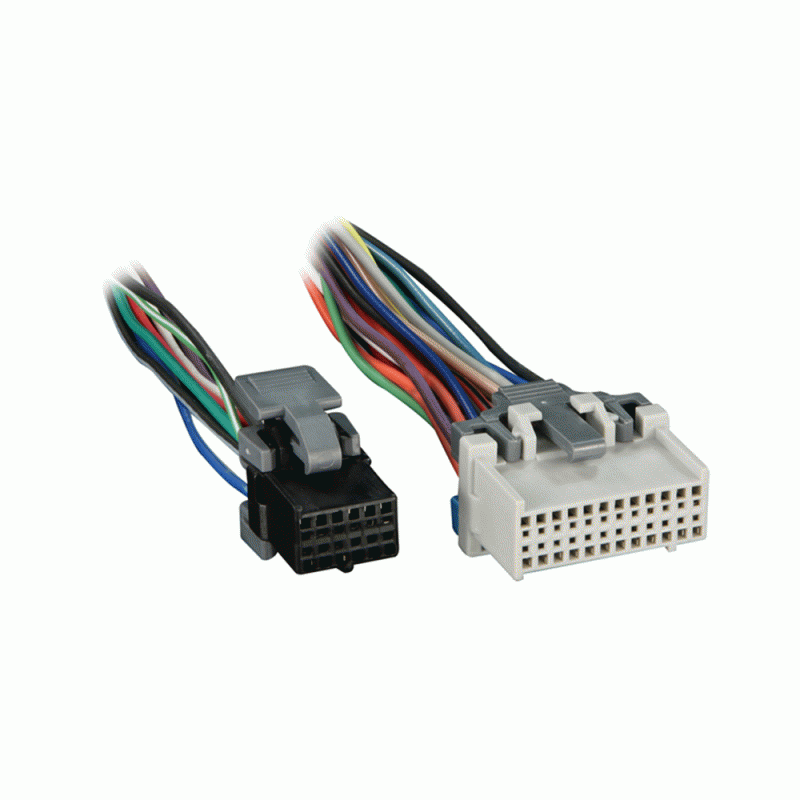
Okay, I was able to get a couple pins out of a harness like this(grey one on right):
I am hoping to do this on Saturday, and I will let you know how it goes.
Re: Splicing an AUX input into the CD player wiring
Posted: Tue Feb 05, 2013 4:31 pm
by 00Beast
Cool, definitely keep us in the loop.
Re: Splicing an AUX input into the CD player wiring
Posted: Tue Feb 05, 2013 5:42 pm
by 2003 SSEi
IIRC the Grey Connector is not the correct pin style for dock and lock connector found in the Bonneville....
The Bonnevilles use GT and Metra Pack 150 and 280 Connectors.,
the one pictured on the Grey connector is a F Micro-Pack 100 Series
Re: Splicing an AUX input into the CD player wiring
Posted: Wed Feb 06, 2013 5:52 pm
by lilstrom13
2003 SSEi wrote:IIRC the Grey Connector is not the correct pin style for dock and lock connector found in the Bonneville....
The Bonnevilles use GT and Metra Pack 150 and 280 Connectors.,
the one pictured on the Grey connector is a F Micro-Pack 100 Series
So there will be no way to get them to work? Let me ask you this, what if I leave bare wires in the harness, as long as they are touching the pins on the other side, will it work?
Thanks,
Joe
Re: Splicing an AUX input into the CD player wiring
Posted: Thu Feb 07, 2013 1:53 pm
by MattStrike
It will work, but over time they will loosen and not make good contact because they are not porperly retained.
If you can't find the correct terminals, just splice it into the other wire. Done correctly, with heat shrink and solder, it will last and won't look like a trained space monkey did the job. If you think you still need a connector, you could just add whatever you have to the wires you spliced, and not worry about finding the correct terminals to match the other one.
